
Last Updated on October 12, 2026
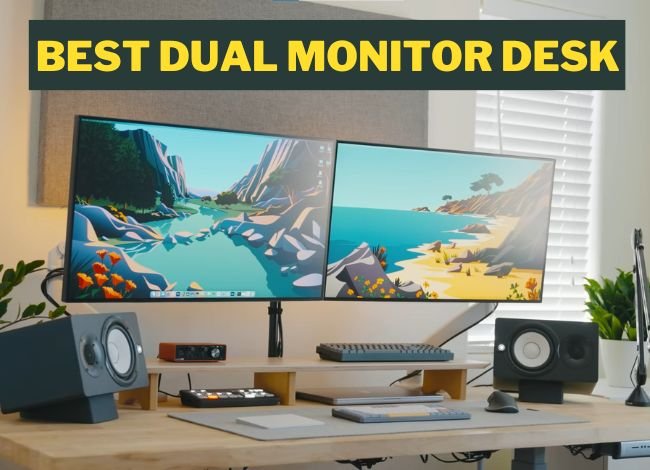
Using two monitors can make certain computer tasks more convenient, especially if you regularly work with spreadsheets, design software, video editing programs, or several documents at once. However, a dual-monitor setup only works well when your desk has enough room for both displays and allows you to position them comfortably. The best dual monitor desk should offer a stable work surface, suitable depth, sufficient weight capacity, and space for your keyboard and other equipment. In this guide, we’ll look at 24 desk options, including traditional computer desks, L-shaped desks, electric standing desks, and desktop converters, to help you choose the right setup for your home or office.
A larger desk can make arranging two monitors easier, but size is not the only factor to consider. A smaller desk may also work if the monitors have compact stands or are mounted on a compatible dual-monitor arm. Before buying, compare the desk’s width, depth, construction, stability, and available legroom. These details can matter more than decorative features or the manufacturer’s marketing claims.
Best Dual Monitor Desk Reviews: 24 Desks to Consider
There are several types of desks suitable for dual-monitor setups. Some offer a wide, flat surface, while others use raised monitor shelves, corner layouts, or height-adjustable frames.
The following models were included in the original comparison. They represent different designs and price categories, but their availability, features, and warranties may have changed. Check the current model specifications before purchasing, especially for older products or desks available in multiple configurations.
1. Tribedesigns 55-Inch Large Computer Desk
The Tribedesigns 55-inch computer desk is a straightforward option for people who want a wide working surface without extra shelves taking up space. The reviewed design combines an engineered wood desktop with a powder-coated metal frame.
A 55-inch desktop may be suitable for two reasonably sized monitors, depending on the width of their stands. The open area beneath the desk also provides useful legroom for everyday computer work.
The original model includes adjustable leveling feet, which may help reduce movement on slightly uneven floors. However, leveling feet cannot compensate for loose frame connections or poor assembly.
Pros:
- Wide work surface for a dual-monitor arrangement.
- Simple metal-frame construction.
- Useful legroom.
- Adjustable leveling feet on the reviewed design.
- Rustic-style finish.
Cons:
- May be relatively heavy to move.
- Stability depends on assembly and floor leveling.
- Current warranty coverage should be verified.
2. FEZIBO 55-Inch Height Adjustable Electric Standing Desk
The FEZIBO 55-inch electric standing desk is worth considering if you want to change between seated and standing work throughout the day.
The original review describes a two-tier layout with an elevated monitor shelf and a lower working area. This arrangement can provide additional space for a keyboard, laptop, or office accessories.
However, FEZIBO sells several 55-inch configurations with different desktop materials and accessories. Not every version has a bamboo desktop, drawers, or casters.
Before buying, confirm the desk’s maximum lifting capacity, minimum and maximum heights, and whether a raised shelf places your monitors at a comfortable viewing height.
Things We Like:
- Electric height adjustment.
- 55-inch work surface.
- Raised monitor shelf on selected configurations.
- Storage hooks and accessories on certain versions.
- Useful for changing working positions.
Things We Don’t Like:
- Assembly can take longer than a basic fixed-height desk.
- Stability may decrease at higher settings.
- Motor, accessories, and warranty vary by model.
3. CubiCubi 63-Inch Computer Desk
The CubiCubi 63-inch computer desk provides a larger working area for people who need two monitors alongside a laptop, notebook, or other accessories.
Its relatively simple design can work for office tasks, studying, gaming, and creative projects. The reviewed version includes a metal frame, engineered wood work surface, and storage accessories.
The extra width makes monitor positioning easier than on many compact desks. However, desktop depth is still important, particularly if you use large displays or prefer them farther from your eyes.
Pros:
- 63-inch desktop provides generous horizontal space.
- Simple design suits different tasks.
- Storage accessories may help reduce clutter.
- Open area beneath the desktop.
Cons:
- Requires enough room for a wide desk.
- Assembly may take some time.
- Desktop material and accessories vary by version.
4. Atlantic PN33906164 Viper Gaming Desk
The Atlantic Viper gaming desk is designed around gaming accessories and equipment organization. The original product description mentions features such as a cup holder, headphone storage, device slots, cable management, and integrated lighting or USB accessories.
These additions can be convenient, but they do not automatically make the desk better for two monitors. What matters most is the usable desktop width, stand clearance, and supported weight.
Because the desk is relatively compact compared with wide office desks, check the dimensions of your monitors before purchasing. Two large displays with broad stands may occupy most of the available surface.
If gaming is your priority, our gaming desk buying guide explores other desk layouts and gaming accessories worth comparing.
Pros:
- Gaming-focused design.
- Cable and accessory organization.
- Space for common gaming equipment.
- Distinctive appearance.
Cons:
- Less desktop space than many 55- or 63-inch office desks.
- Some accessories may not be useful for office work.
- Verify the current load rating and included features.
5. Mr IRONSTONE 50.8-Inch L-Shaped Computer Corner Desk
The Mr IRONSTONE L-shaped computer desk provides two connected work surfaces, making it useful for people who want separate areas for monitors and paperwork.
The reviewed version combines engineered wood panels with a powder-coated steel frame. Adjustable leveling feet can help keep the desk steady on slightly uneven floors.
Some configurations include a removable monitor shelf. However, the shelf’s rated capacity and available width should be checked before placing heavy displays on it.
An L-shaped desk does not necessarily have to sit against a wall, but it usually works best when its footprint matches the room’s layout.
Pros:
- Two connected working areas.
- Useful for computer work and paperwork.
- Metal-frame construction.
- Adjustable feet.
Cons:
- Requires careful room measurements.
- Monitor shelf suitability varies by configuration.
- Corner layout may limit placement options.
6. FEZIBO 42-Inch Height Adjustable Standing Desk
The FEZIBO 42-inch standing desk is a compact option for people who want height adjustment but have limited room for a larger desktop.
Some versions include an elevated monitor shelf, which can help create separate areas for screens and keyboard accessories. However, a 42-inch desk may feel crowded with two large monitors, especially if both have wide stands.
A compatible monitor arm may provide more flexibility, but only if the desktop and manufacturer permit that type of mounting.
The desk’s electric lifting feature makes it possible to change positions during work. This can reduce prolonged sitting but does not guarantee improved posture or productivity by itself.
Pros:
- Compact footprint.
- Height-adjustable design.
- Suitable for smaller workspaces.
- Raised monitor area on selected versions.
Cons:
- Limited room for large dual-monitor setups.
- Frame movement may become more noticeable at standing height.
- Confirm actual desktop material and lifting capacity.
7. JOISCOPE 60-Inch Two-Tier Home Office Desk
The JOISCOPE 60-inch two-tier desk combines a large work surface with additional shelving. This arrangement can be useful for people who want their monitors on the main surface while keeping books and accessories organized nearby.
The original design uses a metal frame and wood-style panels. Its two-tier layout provides storage, but the available monitor positions depend on how the shelves are arranged.
Before buying, check whether any raised shelf interferes with your preferred monitor height or reduces the usable desktop depth.
Things We Like:
- 60-inch working area.
- Additional storage shelves.
- Industrial-style appearance.
- Adjustable leveling feet on the reviewed design.
Things We Don’t Like:
- More components to assemble.
- Shelving may limit monitor arrangement.
- Relatively large overall footprint.
8. VIVO Electric 63-Inch Height Adjustable Stand-Up Desk
The VIVO 63-inch electric standing desk is worth considering if you need a wide work surface and the ability to switch between sitting and standing.
The original review describes a desktop approximately 63 inches wide and 32 inches deep. This combination can provide useful viewing distance and room for two monitors, a keyboard, and other equipment.
Some VIVO configurations have load ratings around 176 pounds, but the capacity depends on the particular frame and desktop. Always confirm whether the published limit includes the desktop.
For a dual-monitor setup, a wide desktop is helpful, but stability at your normal standing height should also be considered.
Pros:
- Wide and relatively deep work area.
- Electric height adjustment.
- Suitable for larger monitor setups.
- Available in different finishes and configurations.
Cons:
- Takes up substantial floor space.
- Heavy components may require assistance during assembly.
- Weight rating and warranty depend on the exact model.
9. Cubiker 63-Inch Computer Desk
The Cubiker 63-inch computer desk is a simple, fixed-height option for people who need more horizontal work space without paying for electric height adjustment.
The reviewed configuration includes a melamine-faced desktop, steel supports, and a side storage bag. Its open design may be convenient for a dual-monitor setup and other everyday office tasks.
Adjustable leg glides can help with minor floor irregularities. However, the desktop must still be properly attached to the frame to prevent movement.
Advantages:
- Large, straightforward desktop.
- Suitable for several computer tasks.
- Storage bag on some versions.
- Adjustable leveling glides.
Disadvantages:
- Assembly may require patience.
- No height adjustment on the reviewed fixed-height design.
- Check panel thickness and support before installing monitor clamps.
10. Coleshome 61-Inch L-Shaped Corner Desk
The Coleshome 61-inch L-shaped desk offers two connected working surfaces, which can help separate monitor use from writing or other activities.
The original description also mentions adjustable footpads and a design that may support alternative arrangements. However, do not assume the desk can be divided into two independent desks unless that feature is confirmed for the exact model.
An L-shaped layout may fit neatly into a room corner, but it does not automatically use less floor space than every straight desk. Measure both sides of the available area.
Pros:
- Large combined work area.
- Useful for multitasking.
- Adjustable feet on the reviewed configuration.
- Corner-friendly design.
Cons:
- Requires enough room along two directions.
- Reversible or separable assembly depends on the specific product.
- Monitor position may require careful planning near the corner joint.
11. VariDesk 36-Inch Converter for Dual Monitors
The VariDesk 36-inch converter is different from a complete desk. It sits on top of an existing work surface and raises the monitors and keyboard to a standing position.
This type of product can be convenient if you already own a sturdy desk and don’t want to replace it. The reviewed design includes an upper monitor area and a lower keyboard platform.
However, a converter raises the working surface above the original desk. Check that the lowest keyboard position is comfortable when you are seated.
Also measure the converter’s base, monitor platform, and weight rating. A 36-inch converter may support some two-monitor arrangements, but very large screens can be difficult to fit.
Pros:
- Uses an existing desk.
- Allows sitting and standing positions.
- Separate keyboard area.
- Does not require purchasing an entirely new workstation.
Cons:
- Occupies a substantial portion of the original desktop.
- Monitor size and weight restrictions apply.
- May position the keyboard too high for some seated users.
12. FLEXISPOT 42-Inch Height Adjustable Desk Converter
The FLEXISPOT 42-inch desk converter is another option for people who want height adjustment without replacing their existing desk.
The reviewed configuration uses an engineered wood platform and a metal lifting mechanism. Its wider upper section may provide more room for two monitors than a compact 32-inch converter.
However, the supported load and platform dimensions must match your monitors. The existing desk also needs to support the combined weight of the converter and equipment.
Pros:
- Wide monitor platform.
- Allows changes between sitting and standing.
- Works with a suitable existing desk.
- Separate keyboard area on the reviewed design.
Cons:
- Requires a strong supporting desk.
- Some movement may occur during height adjustment.
- Available space and warranty vary by model.
13. Walker Edison Ellis 51-Inch Contemporary L-Shaped Desk
The Walker Edison Ellis L-shaped desk combines a metal frame with tempered glass surfaces for a modern appearance.
The original design includes a sliding keyboard tray and two connected desktop sections. This may be useful for separating different tasks or positioning a second monitor to the side.
However, glass desktops require particular care when supporting computer equipment. Do not use a clamp-mounted monitor arm unless the desk manufacturer specifically approves it.
Check the individual glass panel load ratings and avoid placing excessive weight near unsupported edges.
Pros:
- Modern glass-and-metal appearance.
- Two connected work surfaces.
- Keyboard tray on the reviewed design.
- Suitable for certain compact office layouts.
Cons:
- Glass requires careful handling.
- Monitor clamp compatibility may be restricted.
- Load ratings vary by model and panel.
14. Coleshome 39-Inch Modern Office Desk
The Coleshome 39-inch desk is a compact alternative for small bedrooms, study areas, or home offices.
Its simple design combines an engineered wood work surface with a metal frame. Adjustable leveling feet may help keep the desk steady on slightly uneven flooring.
However, a 39-inch desk is not automatically suitable for two large monitors. It may work better with smaller displays, compact stands, or an approved monitor mounting arrangement.
If you are working with a limited room, our guide to choosing a compact office desk covers additional options and sizing considerations.
Pros:
- Compact footprint.
- Simple styling.
- Relatively straightforward construction.
- Useful for light computer work.
Cons:
- Limited space for large monitors.
- May require a monitor arm or compact bases.
- Little room for additional accessories.
15. Cubiker Modern L-Shaped Computer Desk
The Cubiker Modern L-shaped desk offers connected surfaces that can accommodate computer equipment and additional office accessories.
The original configuration includes a metal frame, engineered wood panels, a storage bag, and hooks. Some versions also feature a movable monitor shelf.
For a dual-monitor setup, decide whether both screens should sit together on the main section or whether one should be positioned on the desk’s return side.
If you spend most of your time viewing one screen, it is generally better to keep that display directly in front of you rather than placing it far off to one side.
Pros:
- L-shaped work area.
- Storage accessories on selected versions.
- Useful for multitasking.
- Wood-grain finishes available.
Cons:
- More assembly than a basic straight desk.
- Return section may not be reversible.
- Monitor shelf dimensions and capacity require verification.
16. Soges 59 x 59-Inch L-Shaped Computer Desk
The Soges L-shaped desk provides a large combined working area for computer tasks, gaming, and writing.
The reviewed design uses a metal frame with additional supports and adjustable leveling feet. Some versions also include a CPU holder or storage area.
This type of desk can provide useful room for two monitors while leaving another section available for documents. However, the overall footprint may be considerable, especially in a small room.
Check whether the computer holder provides adequate ventilation and supports the weight of your equipment.
Pros:
- Large L-shaped surface.
- Useful for combined computer and paperwork tasks.
- Additional frame supports.
- Adjustable feet.
Cons:
- Needs sufficient floor space.
- Frame and panel quality should be checked.
- Long-term durability depends on use and assembly.
17. Foxemart 55-Inch Modern Computer Desk
The Foxemart 55-inch computer desk provides a straightforward workspace with a metal frame and engineered wood desktop.
Its relatively open design can make it convenient to position two monitors with space for a keyboard and mouse. The surface is described as easy to clean, but moisture-resistant laminate should not be treated as completely waterproof.
For everyday office work, check that the desk has enough depth to keep your screens at a comfortable viewing distance.
Advantages:
- 55-inch work surface.
- Simple design for computer setups.
- Metal-frame construction.
- Easy-to-clean worktop finish.
Disadvantages:
- Assembly instructions may vary in clarity.
- Engineered wood needs protection from excess moisture.
- Features may differ between product versions.
18. VIVO 32-Inch Standing Desk Converter
The VIVO 32-inch standing desk converter is intended for people who already have a suitable desk but want the option to raise their work equipment.
The reviewed design includes a monitor platform and a separate keyboard tray. Its smaller footprint may suit compact desks, but two large monitors can be difficult to arrange within a 32-inch platform.
Make sure the platform provides enough space for the monitor bases and that the combined weight stays within the listed capacity.
Also check how low the keyboard tray sits when the converter is fully lowered. A converter that raises the keyboard too high may be uncomfortable for seated typing.
Pros:
- Can be used on an existing desk.
- Height-adjustable design.
- Compact compared with larger converters.
- Separate keyboard tray.
Cons:
- Not ideal for every pair of large monitors.
- Adds weight to the existing desk.
- Available height range may not fit every user.
19. GreenForest 58.1-Inch L-Shaped Office Desk
The GreenForest 58.1-inch L-shaped desk is designed for people who prefer a corner workspace with room for multiple activities.
The original version combines metal supports with a wood-style desktop and adjustable leveling feet. Its L-shaped surface may support two monitors and a laptop, depending on their dimensions.
Before buying, measure the usable depth of each section. Some corner desks provide generous overall width but relatively shallow individual panels.
Pros:
- L-shaped workspace.
- Suitable for organizing several work activities.
- Adjustable feet.
- Wood-look finish.
Cons:
- Individual desktop sections may be shallow.
- Requires corner or side-wall clearance.
- Assembly may take longer than expected.
20. TOPSKY Computer Desk With Storage Shelves
The TOPSKY computer desk combines a work surface with storage shelves and a metal frame. The original heading refers to 23.2 inches, which may describe the desk’s depth rather than its full width. Confirm the complete dimensions before buying.
The reviewed configuration includes a rustic-style surface, shelving, and a keyboard tray. These features may help organize office supplies while keeping the primary desktop available for monitors.
However, check that the shelves do not interfere with monitor placement or legroom. The stated load capacity from the older review should also be verified against the current model.
Things We Like:
- Storage shelves.
- Rustic-style finish.
- Keyboard tray on the reviewed version.
- Metal-supported construction.
Things We Don’t Like:
- Assembly involves several components.
- Exact width and load capacity require confirmation.
- Shelves may affect equipment positioning.
21. Coleshome 47-Inch Modern Computer Desk
The Coleshome 47-inch computer desk is a simple option for those who need more room than a compact 39-inch desk but do not want a very large workstation.
The reviewed model combines engineered wood and powder-coated steel. Its smooth surface can be convenient for writing and regular office work.
Two monitors may fit depending on their stands and positioning. For larger displays, a wider desk or approved monitor arm may be more practical.
Pros:
- Moderate width for smaller workspaces.
- Simple appearance.
- Metal-frame construction.
- Easy-to-clean work surface.
Cons:
- May feel crowded with two large monitors.
- Limited built-in storage.
- Desk depth should be checked carefully.
22. IRONCK 55-Inch Industrial Dual Monitor Computer Desk
The IRONCK 55-inch industrial desk combines a wood-style surface with metal supports and additional organizational features.
The original review describes a monitor stand, keyboard tray, and storage compartments. These features can make it easier to organize computer accessories and reduce desktop clutter.
However, do not assume the raised monitor shelf can safely support particularly heavy displays. Confirm the load rating for the shelf itself, not only the main desk.
The original 500-pound capacity claim also requires model-specific confirmation and should not be treated as an established rating without current documentation.
Pros:
- 55-inch working area.
- Industrial-style appearance.
- Additional storage compartments.
- Monitor shelf and keyboard tray on the reviewed model.
Cons:
- Assembly involves several parts.
- Raised shelf capacity requires verification.
- Product-specific weight rating should be checked.
23. Tribedesigns Modern L-Shaped Corner Computer Desk
The Tribedesigns modern L-shaped desk provides two connected work surfaces with a contemporary appearance.
The original configuration describes sides measuring approximately 49.21 inches and 47.24 inches. Check the current dimensions, as designs under the same brand may vary.
The combination of engineered wood panels and metal supports can make it suitable for dual-monitor office work, gaming, or studying.
As with other L-shaped desks, the best monitor arrangement depends on which side you use as your primary workspace.
Pros:
- Two connected work surfaces.
- Modern appearance.
- Metal-supported construction.
- Useful for organizing multiple activities.
Cons:
- Requires room along both desk sides.
- Can take longer to assemble.
- Check the orientation and exact dimensions before purchase.
24. Nost & Host 55-Inch Dual Monitor Desk With Shelf
The Nost & Host 55-inch desk is a wood-look computer desk with a metal frame and additional shelving in the original product description.
Its raised monitor area can create extra space underneath for office accessories. However, monitor height should be checked carefully, since an elevated shelf may position large screens too high.
The original configuration also describes adjustable leveling feet and additional storage shelves. Confirm which of these features are included with the specific listing you are considering.
Advantages:
- 55-inch desktop.
- Raised monitor area.
- Additional storage space.
- Wood-grain appearance.
Setbacks:
- Raised shelf may not suit every monitor height.
- Several components to assemble.
- Current availability and features should be verified.
What to Consider When Picking the Best Dual Monitor Desk
Now that we’ve looked at the different desk models, it’s important to compare the features that affect daily use. The best dual monitor desk isn’t necessarily the largest or most expensive one. It should allow you to position both monitors comfortably while leaving enough space for your keyboard, mouse, and other equipment.
Available Room Space
Start by measuring the room where the desk will be placed. Check its width, depth, and the space needed for your chair.
If you are considering an L-shaped desk, measure both walls or floor areas. Also allow clearance for drawers, doors, and other furniture.
A large desk may provide more working room, but it can also make a small office feel crowded. Choose a layout that leaves enough space to move comfortably.
Desk Width and Depth
Desk width is important for two monitors, but there is no universal minimum that works for everyone.
A 55- to 63-inch desk is often a practical starting point for two typical desktop monitors. However, smaller desks can work with compact displays or compatible monitor arms, while larger displays may require more width.
Depth matters just as much. Your desk should allow you to position the monitors at a comfortable viewing distance without pushing the keyboard too close to the front edge.
For many users, a depth around 24 inches can work, while approximately 28 to 30 inches may provide greater flexibility for larger monitors. The best depth depends on your viewing needs, monitor stands, and equipment.
Desk Style and Layout
Common dual-monitor desk styles include straight rectangular desks, L-shaped desks, standing desks, and desktop converters.
A straight desk is convenient when both monitors need to sit together. An L-shaped desk can provide extra work areas, while a standing desk allows you to change working height.
Desk converters are useful if you already own a suitable desk and want to add height adjustment without replacing the furniture.
Weight Capacity and Stability
Before buying a desk, calculate the approximate weight of your monitors, stands, laptop, speakers, and other equipment.
Check the manufacturer’s weight rating and pay attention to whether it applies to the entire desk, a separate monitor shelf, or a standing converter’s upper platform.
A monitor arm concentrates weight near its mounting point. Even if a desk supports the combined equipment weight, its desktop may not be suitable for a clamp mount.
Look for stable frame connections, suitable leveling feet, and enough support beneath the desktop. Avoid assuming that every steel-framed desk is equally sturdy.
Monitor Arm Compatibility
A dual-monitor arm can free up desk space by lifting both screens off their original stands. However, it must be compatible with the monitors and the desk.
Check the monitors’ VESA mounting pattern, weight, and size limits. Also confirm the clamp or grommet requirements of the arm.
Thin engineered wood panels, glass desks, and desktops with unusual edges may not be suitable for certain clamp-mounted arms. Follow both the desk and monitor-arm manufacturers’ instructions.
Ergonomic Monitor Positioning
Proper monitor positioning is important because repeatedly turning your head to view a poorly placed screen can increase discomfort.
If you use one monitor most of the time, place that screen directly in front of you and position the secondary monitor close beside it.
If you use both monitors equally, place them next to each other in front of you, with their inner edges close together and angled slightly inward as needed.
The top of each screen should generally be at or slightly below eye level, with an appropriate viewing distance that allows you to read comfortably without leaning forward.
There is no fixed 30-degree angle that every dual-monitor setup must use. Adjust the screens to minimize excessive head movement, glare, and awkward posture.
Standing Desk vs. Fixed-Height Desk
A fixed-height desk may be a good choice if it fits your seated working position and you do not need height adjustment.
A height-adjustable desk provides more flexibility because you can change between seated and standing positions. However, it does not eliminate the need for regular movement or a comfortable chair.
If you’re buying an electric desk for two monitors, check its lifting capacity, height range, movement at standing height, and cable clearance.
Ease of Assembly
Assembly difficulty is another factor worth considering. Some fixed-height desks have only a few main components, while L-shaped desks and electric standing desks can involve more hardware.
Read the manufacturer’s assembly instructions before purchasing when possible. Check whether special tools or another person are needed.
After assembly, inspect the frame, leveling feet, desktop connections, and moving parts before placing expensive computer equipment on the desk.
How to Set Up Two Monitors on One Desk
Once you have chosen the right desk, take a little time to arrange your monitors properly. A good setup should reduce unnecessary reaching and head movement while keeping the desktop organized.
- Measure your equipment: Check the width of both monitors, the footprint of their stands, and the available desk depth.
- Choose your primary screen: If you use one display more frequently, place it directly in front of your normal seated position.
- Position the second monitor: Keep the secondary display close to the primary one and angle it inward as needed to avoid excessive neck rotation.
- Adjust the screen height: Position the top of the displays at or slightly below eye level for most users, taking your vision needs into account.
- Arrange your keyboard and mouse: Keep them close enough that you can use them without extending your arms excessively.
- Organize the cables: Route monitor, power, and accessory cables so they don’t interfere with your legs or moving desk components.
- Check the final setup: Sit at the desk and make sure you can view both monitors comfortably without repeated twisting, leaning, or stretching.
Common Dual Monitor Desk Mistakes to Avoid
One common mistake is choosing a desk based only on its width. If the surface is too shallow, your monitors may sit uncomfortably close to your eyes even though both fit side by side.
Another mistake is placing both monitors too far to one side. This can cause unnecessary head and neck rotation during long working sessions.
Some buyers also overlook monitor arm compatibility. Before attaching a clamp-mounted arm, confirm that the desk surface is suitable for the concentrated load.
Finally, do not exceed the desk’s rated capacity or ignore movement during typing. A stable and comfortable workstation is more useful than a large desk that shifts whenever you use it.
Frequently Asked Questions About Dual Monitor Desks
1. What is the best position for two monitors?
If one monitor is your main display, place it directly in front of you and keep the second monitor close beside it. If you use both equally, arrange them side by side in front of you, with a slight inward angle if comfortable. Keep the screens at a suitable height and distance to reduce unnecessary head movement.
2. What should you look for in a dual-monitor stand?
Choose a stand or monitor arm that supports both displays’ size, weight, and mounting requirements. Check height adjustment, available desk space, and mounting compatibility. If using a clamp, make sure the desktop is approved for that type of installation.
3. How do I maximize desk space for two monitors?
You can free up space by using a compatible dual-monitor arm, reducing unnecessary accessories, organizing cables, or placing one screen in portrait orientation when that suits your work. A monitor arm is especially useful if the original stands have large bases, but it must be suitable for the desk’s construction.
4. What desk size is ideal for two monitors?
For many typical dual-monitor setups, a desk around 55 to 63 inches wide offers useful flexibility. However, there is no universal minimum size. Smaller desks may work with compact monitor stands or approved mounting arms, while larger displays may need more width and depth.
5. Should I choose a standing or fixed-height dual-monitor desk?
A fixed-height desk can work well if it matches your comfortable seated position. An adjustable standing desk allows you to alternate between sitting and standing, but it may cost more and require additional assembly. Choose based on your budget, working habits, required height range, and equipment weight.
6. Do I need to angle dual monitors?
Angling the monitors slightly inward can make them easier to view, but the exact angle depends on your screen sizes and how you work. There is no single angle that suits every user. Position the screens so you can see them clearly with minimal neck movement and without excessive glare.
Conclusion
Choosing the best dual monitor desk comes down to finding a stable work surface that fits your monitors, room, equipment, and budget. A wide rectangular desk may be the simplest option, while an L-shaped desk can provide separate work areas. Electric standing desks offer adjustable height, and desk converters can add that flexibility to an existing workstation.
The desk models reviewed above offer different layouts and features, but you should compare their current specifications before purchasing. Some are older products, and not every original feature or warranty will necessarily apply to the model available today.
Most importantly, choose a desk that allows you to position both monitors comfortably, keep the keyboard and mouse within easy reach, and work without unnecessary movement or instability. The right desk setup can make a dual-monitor workstation more convenient and comfortable for everyday use.