
Last Updated on October 12, 2026
L-shaped desks are designed with two connected work surfaces that form the letter “L.” They provide more room than many traditional desks and are popular for home offices, gaming setups, and workstations with multiple monitors. An L-shaped desk for gaming can give you separate areas for your keyboard and mouse, monitors, PC tower, and other accessories without making everything feel crowded. Some models also include drawers, shelves, monitor stands, and built-in cable management. However, before buying one, it’s important to consider the size of your room, the desk’s stability, and how you plan to arrange your gaming equipment.
Should You Buy an L-Shaped Desk for Gaming?
An L-shaped desk can be a good choice for gaming, especially if you use multiple monitors or want plenty of space for your accessories. The two connected surfaces allow you to create separate areas for gaming, studying, streaming, or other computer tasks.
For example, you can place your main gaming monitor, keyboard, and mouse on one side while using the other side for a second monitor, laptop, speakers, or streaming equipment. This arrangement helps keep frequently used items within reach without filling your main gaming area with unnecessary accessories.
An L-shaped desk for gaming is also useful if you want to set up two or three monitors. However, the number of monitors it can accommodate depends on the actual desktop dimensions and the size of your monitor stands. A monitor arm can help free up space, provided the desk supports the mounting hardware and equipment weight.
Another advantage is storage. Many L-shaped desks include shelves, drawers, or raised platforms where you can organize controllers, headphones, notebooks, and other accessories.

That being said, an L-shaped desk is not the best option for everyone. If you have a small bedroom or limited floor space, a large corner desk may make the room feel crowded. Some models also have a relatively narrow desktop, which can make monitor placement more difficult than expected.
Before buying, measure the available space and consider whether the desk will block a doorway, window, or storage cabinet. A compact straight desk may be more practical if you only use one monitor and a few accessories.
What Size L-Shaped Desk Is Best for Gaming?
The best size depends on your gaming equipment and the amount of available space. A compact L-shaped desk with sides measuring approximately 40 to 50 inches may be suitable for a smaller room or a basic single-monitor setup.
If you use two monitors, a large keyboard, speakers, and additional accessories, consider a model with at least one side measuring around 55 to 60 inches. Larger desks can provide more flexibility, but the actual usable area depends on the shape and depth of each surface.
Desk depth is particularly important. A surface around 24 inches deep may work for many monitor setups, while a depth closer to 28 to 30 inches can provide more room to position the screen comfortably. The best viewing distance depends on your monitor size and eyesight. For most computer work, a distance of approximately 20 to 40 inches from your eyes is a useful general guideline.
Also check the desk’s height and legroom. Your keyboard and mouse should be positioned so your shoulders remain relaxed and your wrists stay comfortable while gaming. Avoid desks with low shelves or support bars that prevent you from moving your legs freely.
Are L-Shaped Desks Good for Dual-Monitor Gaming?
Yes, an L-shaped desk can work well with two monitors. You can place both screens along one side or position them near the corner to create a wider viewing area.
If one monitor is your main gaming display, keep it directly in front of your normal sitting position. Place the secondary monitor beside it at a comfortable angle. This helps reduce unnecessary neck movement when switching between screens.
For triple-monitor setups, confirm the combined monitor width and stand dimensions before purchasing the desk. Three large displays may require a much wider usable surface than the product listing suggests.
A dual- or triple-monitor arm can make the setup cleaner, but always check the desk’s construction, mounting compatibility, and weight capacity. Some lightweight desks with thin or hollow desktop panels may not be suitable for heavy clamp-mounted monitor arms.
How to Decorate a Gaming L-Shaped Desk With LED Lights
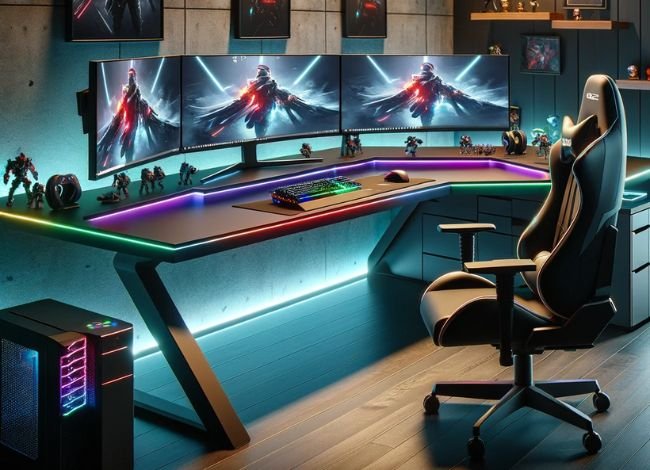
Adding LED lights is a simple way to personalize your gaming desk and make the setup more visually appealing. You can choose a single color for a clean look or use RGB lighting to match your keyboard, mouse, and other gaming accessories.
There are several ways to decorate an L-shaped desk for gaming without making the workspace look too busy.

- Edge lighting: Install LED strip lights along the back or underside edges of your desk to create a glowing outline. A single color can give the workspace a clean appearance, while RGB strips allow you to switch between different lighting effects. Keep the strips away from surfaces where your hands or arms regularly rest.
- Accent lighting: Use LED lights behind your monitor or around a shelf to highlight specific parts of your setup. Soft lighting behind the screen can create a pleasant background glow without shining directly into your eyes.
- Under-desk lighting: Attach LED strips beneath the desktop to create a subtle glow around the lower part of your workstation. This can look especially attractive on desks with open metal frames. Make sure the lights and cables do not interfere with your legs or chair.
- Custom RGB lighting: If you enjoy experimenting with colors, use compatible RGB strips and controllers to create different lighting scenes. Some systems can synchronize with games or other accessories, although compatibility depends on the specific products and software.
Before installing LED strips, clean and dry the mounting surfaces so the adhesive can attach properly. If the strips do not stay in place, use suitable mounting clips rather than repeatedly applying weak adhesive.
Use the power supply recommended for your LED system and avoid connecting more lighting than the controller or adapter can safely support. Follow the manufacturer’s instructions for strip length, ventilation, and installation. Do not place LED strips or wiring where they may become pinched, damaged, or exposed to liquids.
For a more comfortable gaming environment, avoid excessively bright or rapidly flashing lighting, especially if you are sensitive to visual effects. A softer, indirect glow is often more pleasant during long gaming sessions.
How to Organize an L-Shaped Gaming Desk
A large gaming desk can become cluttered if you do not organize it properly. Fortunately, the L-shaped design makes it easier to separate your main gaming equipment from less frequently used accessories.
Start by choosing which side will be your primary gaming area. Keep your main monitor, keyboard, and mouse there, and position your chair so you can face the monitor without constantly turning your neck.
Use the second side for accessories such as a microphone, laptop, controller charging station, speakers, or documents. If you have a PC tower, place it where the cooling vents have enough airflow and the case is securely supported. Avoid enclosing the computer in a tightly packed compartment.
Cable management can make a noticeable difference. Use cable clips, reusable ties, or an under-desk cable tray to organize power and data cables. Keep cables away from chair wheels and leave enough slack for moving or adjustable equipment.
Finally, avoid filling every available corner with accessories. A little free desk space makes it easier to clean your setup, move your mouse, and work comfortably.
L-Shaped Desk Prices: How Much Should You Spend?
The price of an L-shaped desk varies depending on its size, materials, construction, and features. Basic models are generally more affordable, while larger desks with electric height adjustment or premium surfaces can cost considerably more.
The following are approximate price ranges in US dollars, not fixed retail prices. Actual prices may vary by retailer, brand, shipping cost, and available discounts.

- Budget ($80–$200): Basic L-shaped desks are often made from particleboard, engineered wood, laminate, and lightweight metal frames. They can be suitable for a simple gaming setup, although desktop thickness, stability, and weight capacity vary considerably. Check customer reviews and assembly requirements before choosing a low-cost model.
- Mid-range ($200–$500): Desks in this range may offer thicker work surfaces, sturdier frames, additional storage, and improved cable management. Some models include monitor shelves or reversible layouts. This price range can provide a useful balance between cost, available features, and construction quality.
- Premium ($500 and above): Higher-priced L-shaped desks may include electric height adjustment, larger desktops, stronger frames, premium finishes, and programmable controls. Some solid-wood or commercial-grade models can cost substantially more. The higher price does not automatically guarantee better quality, so compare the actual specifications and warranty coverage.
Before choosing a desk based on price alone, check the weight capacity, frame stability, desktop material, warranty, and return policy. A less expensive desk may be perfectly suitable for a single-monitor setup, while heavier equipment may require a stronger frame.
What to Check Before Buying an L-Shaped Gaming Desk
Not every L-shaped desk has the same design or build quality. A few details can help you avoid buying a desk that looks good in pictures but does not suit your actual gaming setup.
- Room dimensions: Measure both walls where you plan to place the desk. Leave enough room for your chair, nearby furniture, and access to doors or drawers.
- Reversible design: Some L-shaped desks allow you to install the return section on either side. Others have a fixed left- or right-hand layout. Confirm the configuration before ordering.
- Desk depth: Check whether the main gaming surface provides enough room for your monitor, keyboard, and mouse while maintaining a comfortable viewing distance.
- Weight capacity: Make sure the desktop can support your monitors, computer, speakers, and other accessories. Check whether the capacity applies to the entire desk or individual sections.
- Frame stability: Look for a well-supported frame with secure connections and suitable leveling feet. A desk that shakes during normal keyboard or mouse use can become distracting.
- Monitor arm compatibility: If you plan to use a clamp-mounted arm, verify that the desktop thickness, edge design, and material are suitable for the mount.
- Assembly requirements: Larger L-shaped desks may arrive in several boxes and require significant assembly. Check the instructions, included hardware, and whether assistance is recommended.
Frequently Asked Questions About L-Shaped Gaming Desks
1. Is an L-shaped desk better than a straight desk for gaming?
An L-shaped desk can be better if you need separate areas for gaming, streaming, or multiple monitors. However, a straight desk may be more practical for a smaller room or a simple single-monitor setup. The best choice depends on your available space and equipment.
2. Can an L-shaped gaming desk hold three monitors?
Yes, some L-shaped desks can accommodate three monitors, but the available surface area and weight capacity must be sufficient. Check the monitor dimensions and consider using compatible monitor arms if you need more usable desk space.
3. Are L-shaped desks suitable for small bedrooms?
A compact L-shaped desk may fit well into an unused corner of a small bedroom. However, you should measure the room carefully and leave enough clearance for your chair and nearby furniture. In some spaces, a narrow straight desk may be a better choice.
4. Can you put LED lights on an L-shaped desk?
Yes. LED strips can be installed along the back edge, underneath the desktop, or behind monitors. Use lighting products with a suitable power supply and follow their installation instructions. Avoid placing cables near moving parts or areas where they can be damaged.
5. Is an L-shaped standing desk worth buying?
An adjustable L-shaped standing desk may be worth considering if you want to alternate between sitting and standing while working or gaming. However, it generally costs more than a fixed-height desk. Make sure the height range, stability, and weight capacity meet your needs.
6. How much should I spend on an L-shaped gaming desk?
A basic model may cost under $200, while sturdier mid-range options commonly fall between $200 and $500. Premium models, particularly electric standing desks, may cost $500 or considerably more. Choose according to the size, stability, and features you actually need rather than price alone.
Final Thoughts
An L-shaped desk for gaming can be a practical option if you need extra space for multiple monitors, gaming accessories, or a combined gaming and work setup. Its two connected surfaces make it easier to organize equipment and keep your main gaming area clear.
However, the right desk depends on your room size, equipment, and budget. Before buying, compare the actual desktop dimensions, frame stability, legroom, and weight capacity. If you plan to add LED lights or monitor arms, check their installation requirements as well.
A well-sized, stable desk with a comfortable monitor and keyboard position will usually be more useful in the long run than one that simply has the most features.